
• FEATURES
  • PACKAGES
  • ADDONS
  • INSTALLATION
  • SUPPORT
  • BLOGS
Book a Demo Buy Now

How to add more numbers in ICTBroadcast?

ICTBroadcast facilitates their users to add extra contact details as per requirement. There are simple steps are listed below to add more fields:
Navigate to the campaign’s main menu, then click on campaign default settings. Click on the contact option on-page, it will open the general contact configuration form. By default following settings are available in the system.

Add more contact in ICTBroadcast

Click on the drop-down, select (Secondary phone number, Tertiary phone number) from the list. Write secondary and tertiary contact numbers in custom fields boxes. Click on the Save button to complete the action as shown below:
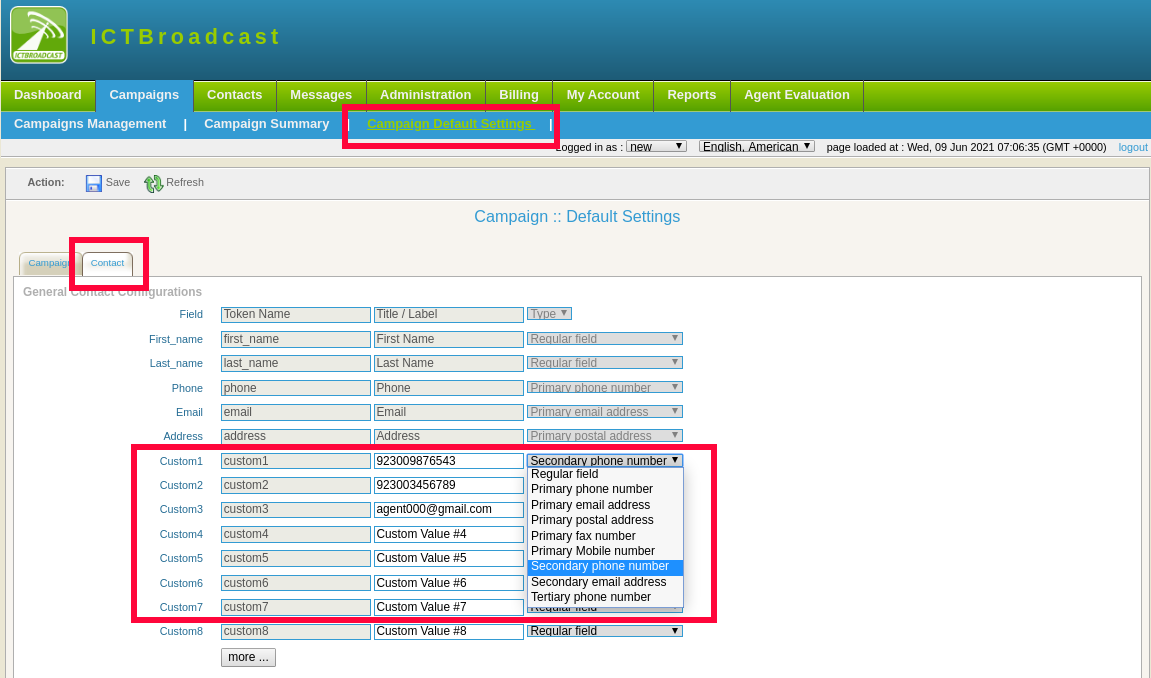
add seconday contacts in ICTBroadcast

NAVIGATIONS

HOME

FEATURES

PACKAGES

ADDONS

FREE TRAIL

SUPPORT

BLOGS

POSTS

Real Estate Auto Dialer: How Top Agents Call More Leads in Less Time

Apr 30, 2026 | call center

A real estate auto dialer helps agents reach 3-4x more leads per hour. Learn which dialing mode fits your team, TCPA compliance rules, and how to measure ROI.

Top Call Center Software to Boost Customer Service in 2025

Apr 23, 2026 | call center

Introduction to Call Center Software In the current fast-moving business landscape, delivering outstanding customer service is vital for achieving success. Companies around the globe are continually seeking methods to enhance their communication channels, optimize...

« Older Entries

ICT Projects

ICTFax

ICTCore

ICTDialer

ICTCrm

ICTContact

ICTSchool

ICTUstad

ICTRoshni

Copyright 2026 | All Rights Reserved

  • Follow
  • Follow
  • Follow
  • Follow
Award 1 Award 2