
• FEATURES
  • PACKAGES
  • ADDONS
  • SUPPORT
  • BLOGS
Book a Demo Buy Now

How to add more numbers in ICTBroadcast?

ICTBroadcast facilitates their users to add extra contact details as per requirement. There are simple steps are listed below to add more fields:
Navigate to the campaign’s main menu, then click on campaign default settings. Click on the contact option on-page, it will open the general contact configuration form. By default following settings are available in the system.

Add more contact in ICTBroadcast

Click on the drop-down, select (Secondary phone number, Tertiary phone number) from the list. Write secondary and tertiary contact numbers in custom fields boxes. Click on the Save button to complete the action as shown below:
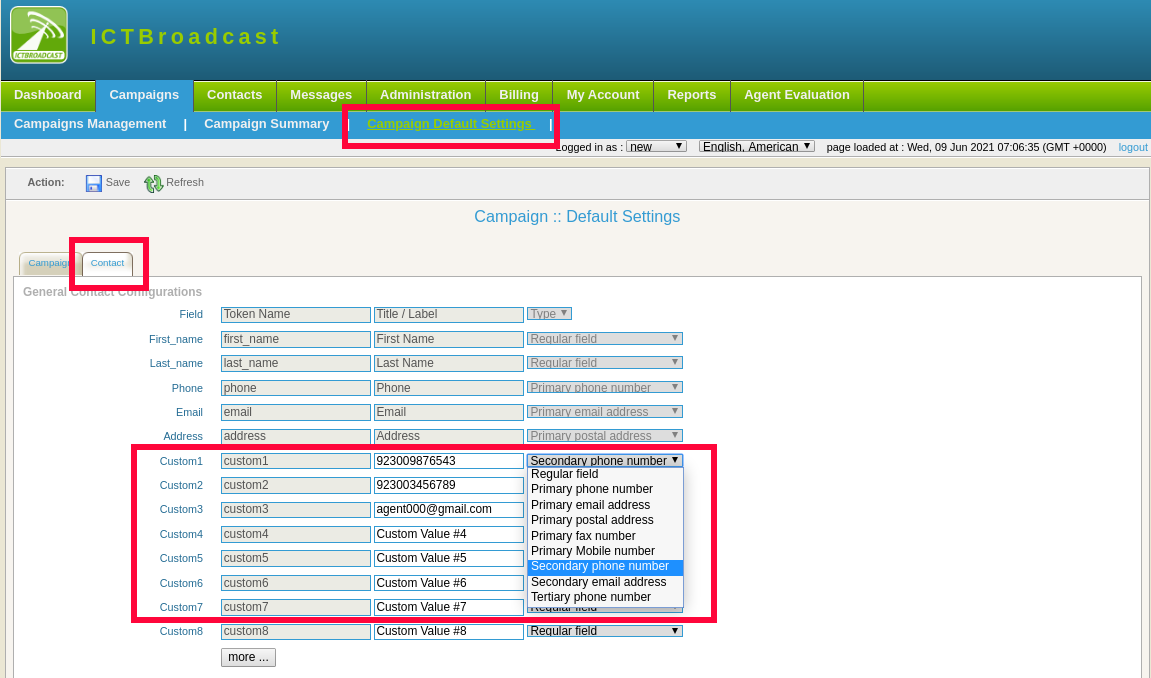
add seconday contacts in ICTBroadcast

NAVIGATIONS

HOME

FEATURES

PACKAGES

ADDONS

SUPPORT

BLOGS

POSTS

AI Cold Calling Software: How to Automate Outbound Calls Without Sounding Robotic

Jun 9, 2026 | call center

AI cold calling software automates outbound dialing and qualification so reps spend time only on live, interested prospects. Here is how it works and how to keep it human.

Self-Hosted Auto Dialer Software: Own Your Stack, Cut Your Costs

May 31, 2026 | call center

Self-hosted auto dialer software cuts per-agent fees and keeps your call data in-house. Here’s how to pick an affordable, open source dialer.

« Older Entries

ICT Projects

ICTFax

ICTCore

ICTDialer

ICTCrm

ICTContact

ICTSchool

ICTUstad

ICTRoshni

Copyright 2026 | All Rights Reserved

  • Follow
  • Follow
  • Follow
  • Follow
Award 1 Award 2