
Teleflora has agreed to pay $6 million, about $251 per phone number, to settle claims that it sent promotional texts to people on the National Do Not Call Registry. If your call center software sends SMS campaigns, the settlement is a clear price tag on a check that takes minutes to run before every send.
The case is Carter v. Teleflora LLC, filed on 26 June 2026 in the Circuit Court for Miami-Dade County, Florida (case 2026-012979-CA-01). The court gave preliminary approval on 26 August, the notice went out this month, and the final approval hearing is set for 25 November 2026. Teleflora denies doing anything wrong. It settled anyway, and the reasons it did are worth reading if you run outbound messaging.
Who is in the class
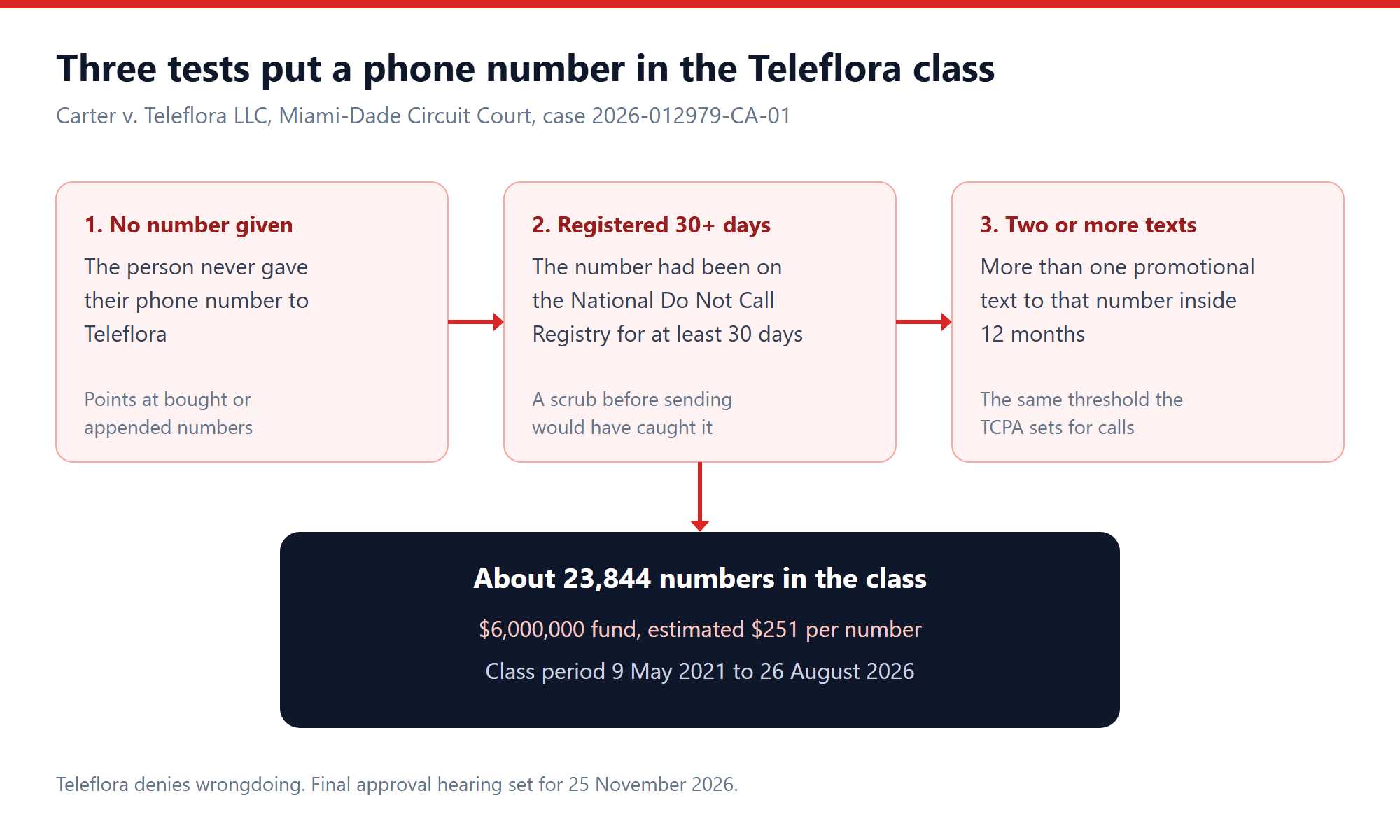
The class definition is short, and every word in it is a test your own campaigns can fail. A phone number is in if all three of these are true:
- The person never gave Teleflora their number. That phrase points at numbers that came from somewhere else, such as a bought list, a data append or a partner.
- The number had been on the National Do Not Call Registry for at least 30 days when the texts arrived.
- Teleflora sent more than one promotional text to it within 12 months. The class period runs from 9 May 2021 to 26 August 2026.
About 23,844 numbers qualify. Six million dollars across that many numbers is where the $251 estimate comes from, before fees and administration costs come out of it.
Why texts count as calls here
The TCPA’s Do Not Call section, 47 U.S.C. 227(c), lets a person sue when they get more than one telemarketing call within 12 months while their number is on the registry. Damages are up to $500 per violation, and a court can triple that if the violation was willful or knowing.
The FCC said in December 2023, in order FCC 23-107, that it was codifying the registry’s protections for text messages as well as calls. So the federal regulator’s position is plain: a marketing text to a registered number is treated the way a marketing call would be.
Some courts have read the statute differently. Eric Troutman of TCPAWorld, writing about this settlement on 19 October, pointed to recent decisions holding that texts fall outside the DNC rules, that cell phones aren’t covered, or that there’s no private right of action under those rules at all. His view is that Teleflora paid more than it had to. That may be right, but it’s a split, not a settled rule. Plenty of defendants decide that $251 a number is cheaper than finding out which side of the split their judge lands on.
For a business sending texts, the practical reading is simple. Don’t build your campaign on the hope of winning that argument. Scrub as if texts are covered, because the FCC says they are.
The defense Teleflora could have used
The DNC rules carry a safe harbor. Under 47 CFR 64.1200(c)(2), a seller that shows it followed routine business practices can defend a call or text that slipped through by mistake. The rule lists what those practices are:
- written procedures for complying with the national Do Not Call rules
- training for staff on those procedures
- a list of numbers the seller may not contact
- a process that checks the registry using a version no more than 31 days old
- records showing all of this happened
The safe harbor protects a business that made an error despite doing the work. It doesn’t help a business that never scrubbed in the first place, and it only works if you can prove the process with records.
Four checks before a marketing text goes out
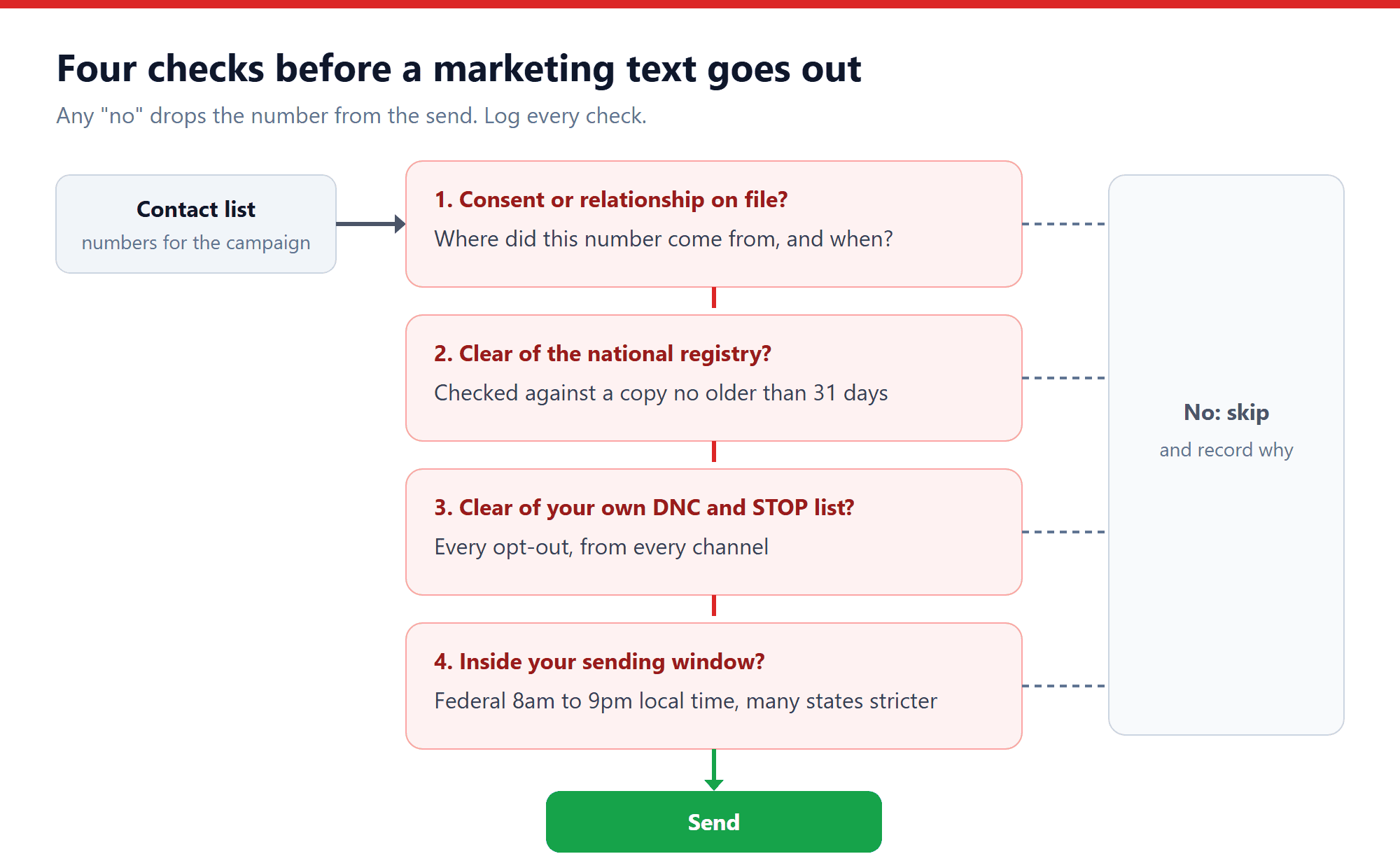
Here’s the order we’d run them in on every SMS broadcast. Any “no” drops the number from that send, and the reason gets logged.
- Is there consent or a relationship on file? Know where each number came from and when. “The person gave us this number” is a very different position from “a vendor sold us this number”, and the class definition turns on that difference.
- Is the number clear of the national registry? Check against a registry copy that’s no older than 31 days. If a number joins the registry, you have up to 31 days to honor it, not forever.
- Is it clear of your own DNC and STOP list? Every opt-out counts, whether it arrived as a STOP reply, a keypress on a voice call, an email or a word to an agent. It should block every channel, not just the one it came in on.
- Is it inside your sending window? Federal rules allow telephone solicitations between 8am and 9pm in the recipient’s local time. Many states set tighter hours and add days of the week.
Count texts per number, too. The statute’s trigger is more than one message in 12 months, so a business that sends one promotional text a week to a registered number crosses it in the second week.
How ICTBroadcast handles DNC for SMS
ICTBroadcast runs voice, SMS, email and fax campaigns from one system, and it keeps two kinds of Do Not Call list. The Master DNC list holds country-wide registry data, such as numbers you download from the FTC’s registry, and the User DNC list holds each user’s own opt-outs. Any number on a DNC list is skipped automatically when a campaign runs. The DNC support page explains both lists.
On SMS campaigns, when someone replies STOP, the platform adds them to your do-not-contact list so they drop out of every future campaign. The SMS broadcasting guide covers throttling, delivery reports and opt-out handling in detail.
What the software can’t do is decide where your numbers came from or keep your registry copy fresh for you. Downloading the registry, loading it on a schedule that keeps it inside 31 days, and keeping consent records are your jobs. As our DNC page says, it’s up to each user to follow federal and state law. If you’re unsure what consent your campaign needs in the first place, we covered the latest consent ruling in the robocall consent case everyone is quoting wrong.
A good test is to pick ten numbers from your last SMS campaign and try to answer two questions for each one. Where did this number come from, and when did we last check it against the registry? If you can’t answer both from your records, that’s the gap a class action would find.
Frequently asked questions
How much is the Teleflora settlement per person?
The fund is $6 million for about 23,844 phone numbers, so the estimate is up to $251 per number, before attorney fees and administration costs are taken out.
Do Do Not Call rules apply to text messages?
The FCC says yes. In December 2023 it codified that National Do Not Call Registry protections extend to texts. Some courts have recently disagreed, so the question isn’t fully settled, but the safest course is to treat marketing texts like marketing calls.
How often do I need to scrub against the Do Not Call Registry?
The FCC’s safe harbor requires a registry version obtained no more than 31 days before the call or text. In practice that means refreshing your copy at least monthly and scrubbing before each campaign.
Does a STOP reply count as a Do Not Call request?
Treat it as one. A STOP reply should go on your internal do-not-contact list straight away and block that number across every channel you use, not just SMS.
Does ICTBroadcast scrub against the national registry automatically?
ICTBroadcast skips any number on its Master DNC or User DNC lists. You load the registry data into the Master DNC list yourself and keep it current. STOP replies to SMS campaigns are added to the do-not-contact list automatically.