
• FEATURES
  • PACKAGES
  • ADDONS
  • SUPPORT
  • BLOGS
Book a Demo Buy Now

How to add more numbers in ICTBroadcast?

ICTBroadcast facilitates their users to add extra contact details as per requirement. There are simple steps are listed below to add more fields:
Navigate to the campaign’s main menu, then click on campaign default settings. Click on the contact option on-page, it will open the general contact configuration form. By default following settings are available in the system.

Add more contact in ICTBroadcast

Click on the drop-down, select (Secondary phone number, Tertiary phone number) from the list. Write secondary and tertiary contact numbers in custom fields boxes. Click on the Save button to complete the action as shown below:
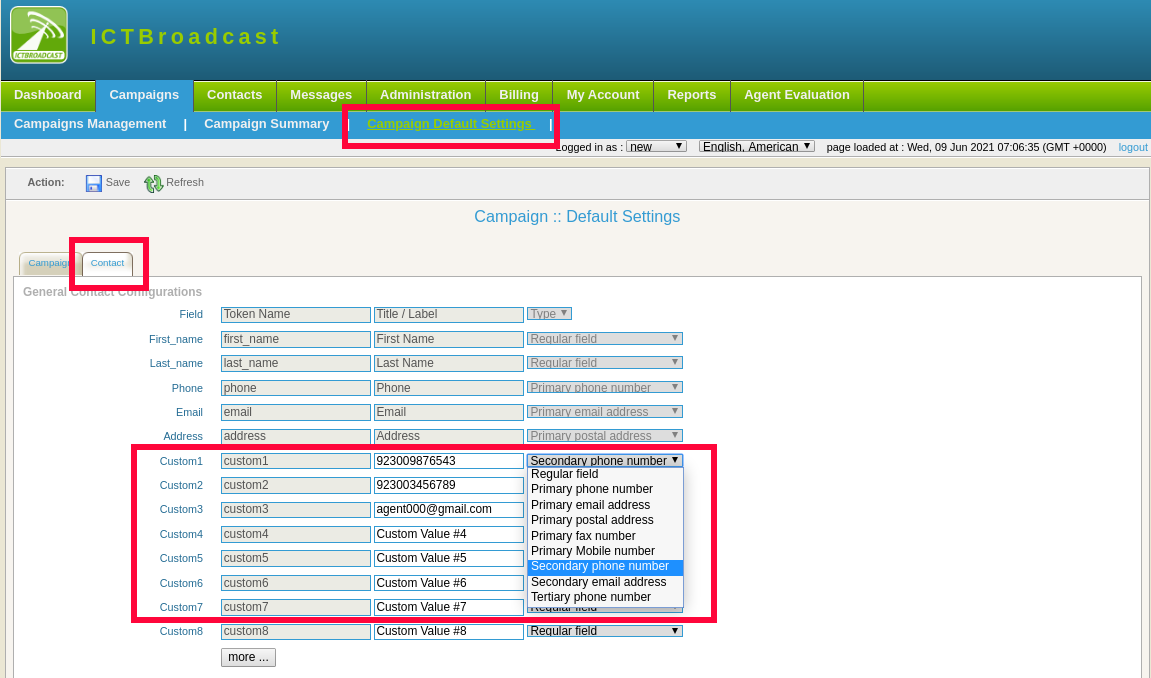
add seconday contacts in ICTBroadcast

NAVIGATIONS

HOME

FEATURES

PACKAGES

ADDONS

SUPPORT

BLOGS

POSTS

Proactive Welcome Calls Cut Churn in Half: What New 2026 Data Means for Call Center Software

Jul 14, 2026 | call center

Fresh results shared at CCW 2026 show proactive welcome calls halve early cancellations. Here’s the data, and how to run the same play with automated outbound campaigns.

How Predictive Dialers Work in 2026: Pacing, Abandonment, and Compliance

Jul 9, 2026 | call center

An operator-tested look at how predictive dialer software paces calls, filters voicemail, and stays under the 3% abandonment cap in 2026.

« Older Entries

ICT Projects

ICTFax

ICTCore

ICTDialer

ICTCrm

ICTContact

ICTSchool

ICTUstad

ICTRoshni

Copyright 2026 | All Rights Reserved

  • Follow
  • Follow
  • Follow
  • Follow
Award 1 Award 2