
VoIP auto dialer software runs automated calling campaigns at scale, so you can reach thousands of contacts in minutes instead of dialing by hand. ICTBroadcast is built on high-performance VoIP technology and goes beyond a simple dialer: it lets you manage customer retention, send time-sensitive alerts, run a survey, or push a political campaign from one platform.
Its scalable architecture lets companies, service providers, NGOs, and political groups automate outreach across voice calls, SMS, email, and fax. Every campaign type is supported, including appointment reminders, polls, press-1 campaigns, and interactive voice response (IVR), all managed from a simple web interface. Built-in call scheduling, contact group management, dynamic caller ID, and real-time reporting cut the manual load on your team and improve delivery accuracy.
What Is ICTBroadcast VoIP Auto Dialer Software?
ICTBroadcast is VoIP auto dialer software that automates high-volume outbound communication across voice, SMS, email, and fax. Built on open-source telephony, it pairs automated dialing with campaign logic, so you can reach thousands of contacts without manual effort.
It supports IVR and press-1 responses, plus progressive, predictive, and power dialing. The platform is web-based, multilingual, and multi-tenant, which makes it a fit for commercial, telecom, government, and nonprofit teams. It also includes CRM connectivity, real-time analytics, DNC (Do Not Call) tools, and contact filtering, with a REST API for third-party integration. Whether you’re running customer outreach, lead generation, surveys, or emergency notifications, ICTBroadcast becomes the foundation of your outbound communication.
Types of VoIP Auto Dialer for Every Need
Power dialer: dials one number per agent, balancing speed with conversation quality. It suits campaigns that rely on personal contact, like onboarding or sales follow-ups.
Preview dialer: shows customer details before the call connects, so agents can prepare. It’s ideal where context matters, such as collections or healthcare calls.
Progressive dialer: waits until an agent is free before placing the next call. That cuts dropped calls and keeps a steady pace for polls or renewals.
Predictive dialer: the predictive dialer uses algorithms to dial many numbers at once and connects only answered calls to free agents. It maximizes talk time on large campaigns like lead generation or political outreach.
Voice broadcasting: sends pre-recorded messages to thousands of people with no agent involved. It’s perfect for alerts, notifications, and promotions delivered fast.
Interactive voice broadcasting: adds keypress inputs to voice broadcasting, so you can run RSVPs, confirmations, or surveys with real-time, two-way responses at scale.
How VoIP Auto Dialer Software Works
ICTBroadcast automates outbound calling through scheduling, contact-list management, and campaign logic. You start by importing or creating contact lists, then pick a campaign type such as voice broadcasting, survey, appointment reminder, or press-1. The system places calls over SIP or VoIP trunks and connects to PSTN or mobile networks through supported gateways.
Once a campaign launches, it dials each number, plays pre-recorded audio, collects DTMF responses, or routes calls to agents when needed. Dynamic fields let you personalize messages, and auto-retry re-attempts dropped or failed calls to lift delivery rates. Real-time analytics let you watch campaign status, call outcomes, agent availability, and response rates. Multi-tenant support and the web interface make it a fit for call centers, emergency alerts, and telemarketing firms running large operations across clients or departments.
Key Features of ICTBroadcast VoIP Auto Dialer Software
Multiple Campaign Dialing Modes
Voice broadcasting, IVR, press-1, survey calls, and appointment reminders all run from the same platform. You pick the campaign style that fits your goal, whether that’s health reminders, marketing, or political outreach, and it supports both manual and automated campaigns so large operations stay simple.
Contact Management
Manage large contact lists with bulk CSV import and categorization by tags, lists, or custom fields. Filtering lets you segment contacts for focused outreach, and contact-status tracking keeps the right message going to the right audience. You control timing with time zones, call schedules, retry attempts, and blacklists.
Text-to-Speech Integration
ICTBroadcast integrates with premium text-to-speech (TTS) engines, so you can build personalized audio on the fly, including a recipient’s name or appointment time. TTS supports several languages and natural-sounding voices, and it removes the need to re-record audio when scripts change.
Live Monitoring and Reports
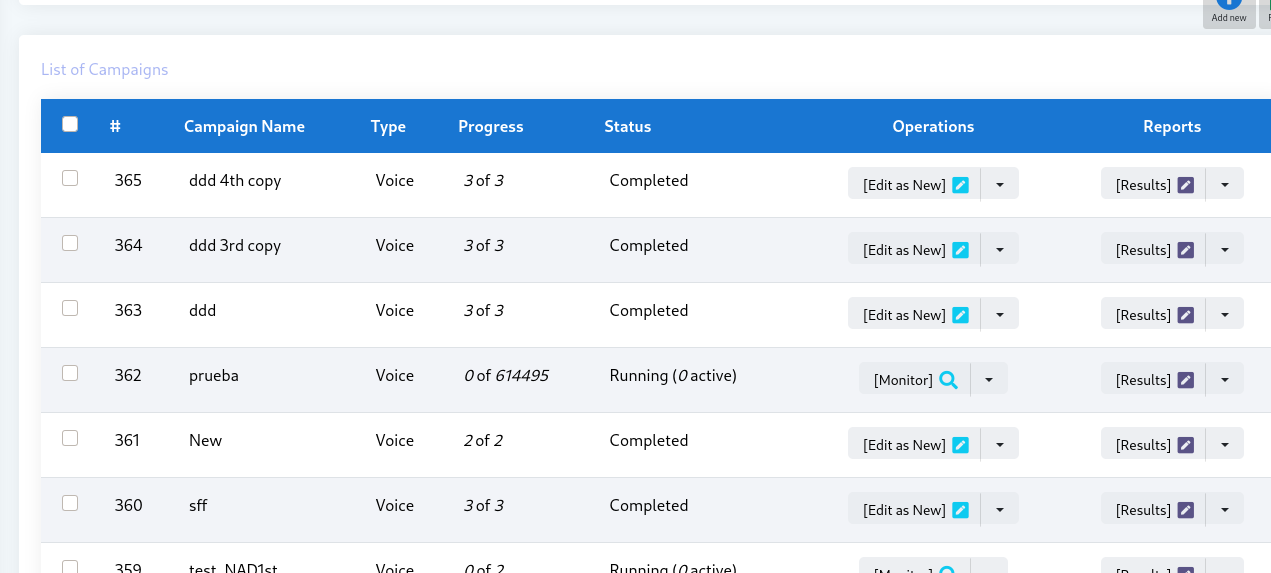
A real-time dashboard shows agent activity, call outcomes, success and failure ratios, and live call status. Detailed reports cover call length, response rates, and dropped calls, and you can export them to share with stakeholders.
Multi-Tenant Architecture
A true multi-tenant design lets multiple users, departments, or clients work independently in the same instance, each with its own data, dashboards, and permissions. Administrators set resource limits, campaign quotas, and billing per tenant, which suits large companies and hosted call-center providers.
API and CRM Integration
RESTful APIs connect ICTBroadcast to outside CRMs and third-party platforms. Developers can automate contact syncing, data retrieval, and campaign launches, integrate with ticketing systems, or build custom apps, so your communication stack matches your business logic.
Blacklist and DNC Management
Built-in Do Not Call (DNC) and blacklist management keep you compliant. Upload official or internal DNC lists and the system screens out prohibited numbers automatically. Blacklists can be set at the campaign or user level for precise control.
Agent Assistance and Call Transfer
For campaigns that need a human, ICTBroadcast offers web-based softphones, live agent dashboards, and automated call transfers. Press-1 calls route straight to available agents, and supervisors can monitor or join calls. Agent screens show caller data, history, and script reminders, which suits mixed inbound and outbound contact centers.
IVR Studio
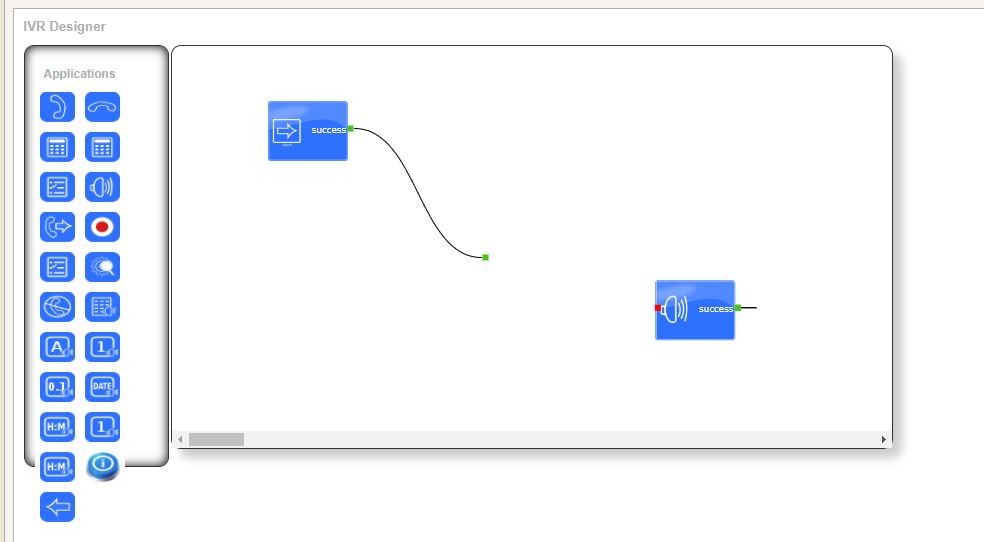
The built-in IVR Studio is a graphical designer for building interactive voice response flows with no coding. Design call trees, set input actions, route by DTMF, and connect to outside systems for data-driven logic. The drag-and-drop interface makes it quick to test and deploy appointment confirmations, polls, or self-service hotlines.
Deployment and Compliance Notes
APIs and webhooks: webhook support and REST APIs connect ICTBroadcast to CRMs, ERPs, and other systems, so data stays in one place.
Compliance controls: DNC support, opt-out options, call-recording controls, and time-based dialing can be tuned to local rules to reduce legal risk.
Cloud hosting: deploy on scalable cloud infrastructure for high availability, with QoS settings and bandwidth monitoring to protect call quality during high-volume campaigns.
Documentation and training: user guides, video tutorials, and demo environments help you onboard staff and run test campaigns before going live.
List hygiene: segmentation, duplicate removal, and contact validation keep your call lists current and improve campaign success rates.
Frequently Asked Questions
What is VoIP auto dialer software?
It’s software that places outbound calls automatically over VoIP and SIP trunks, then plays a message, collects keypresses, or connects answered calls to agents. ICTBroadcast handles this across voice, SMS, email, and fax from one platform.
How many calls can ICTBroadcast handle?
It’s built for high-volume campaigns and carrier-grade scale, so it can place thousands of calls per campaign. Actual throughput depends on your VoIP trunks, gateways, and server resources.
Does it support predictive dialing?
Yes. ICTBroadcast supports predictive, power, progressive, and preview dialing, plus voice broadcasting and press-1 campaigns, so you can match the mode to each campaign.
Can I integrate ICTBroadcast with my CRM?
Yes. RESTful APIs and webhooks let you sync contacts, pull data, and launch campaigns from your CRM or other business systems.
Is ICTBroadcast suitable for service providers?
Yes. Its multi-tenant architecture lets you host separate clients or departments in one instance, each with its own data, quotas, and billing, which is ideal for hosted call-center services.
VoIP Auto Dialer Terms Explained
The dialing modes below sound similar, but the difference is all about how many lines the system dials per available agent. Get this right and you cut idle time without annoying people with dropped calls.- VoIP auto dialer
- Software that places outbound calls over the internet using SIP trunks instead of physical phone lines, then connects answered calls to agents or plays a recorded message.
- Preview dialer
- The agent sees each contact's details before the call is placed, then triggers the dial. Best for high-value or complex calls where prep matters.
- Progressive dialer
- The system dials the next contact automatically as soon as an agent is free, one line per agent. Steady pace, no dropped calls.
- Predictive dialer
- The system dials several lines per agent at once, predicting when agents will become free, so connected calls arrive just as someone is ready. Highest throughput.
- Pacing ratio
- How many lines the predictive engine dials per available agent. A higher ratio means more connects per hour but a greater chance of an abandoned call.
- Abandon rate
- The share of answered calls with no free agent to take them. Compliance rules often cap this, so ICTBroadcast lets you set a target and paces dialing to stay under it.
- Answering machine detection (AMD)
- Logic that tells a live person from a voicemail greeting, so machines are filtered out or routed to a recorded drop instead of an agent.
- SIP trunk
- The VoIP connection to your carrier that carries the actual call traffic in and out of the platform.