
##### Note : Please configure Gateway / sip provider account , add contact and voice recording before going through these instructions
Create Agent through Admin / User Portal
– Visit https://your-domain.com/login.php?action=user
– login as admin
– create extension in ICTBroadcast
Goto Administration Menu ==> Click on Agent / Extensions => Click on “New Extension” button
Enter Agent Name, Agent Number and Password then click on save button
–
Crate Queue / Skill Group
Goto Administration Menu ==> Click on Agent / Extensions => Click on “New Extension” button
Enter Agent Name, Agent Number, select “Skill Group” from “Forward To” and select Agents for this Queue / Skill Group and then click on save button
–
assign extension and Queue to some user
Goto Administration Menu => User Management
click on Drop-down arrow of any user under the “OPERATIONS” column
Select agents and skill-group and then click on assign button
Agent Portal Steps
– Now login as Agent from different computer
– Visit https://your-domain.com/login.php?action=agent
– Enter agent number and agent password
– click on ready button from agent phone portal
– when agent ready, you can listen music in background
Lunch Agent / Interactive Campaign
– Goto Admin / User Portal
– Create new interactive / agent campaign
Goto Campaign Menu ==> Campaign Management ==> Add New
click on agent / interactive (press 1) campaign
enter campaign name, select contact group and select Queue / Skill Group in Agent / Operator Extension and enter other required details and click on save button
when call recipient press required key while voice message being played then call will be transfer to free / live agent
Using webphone
————–
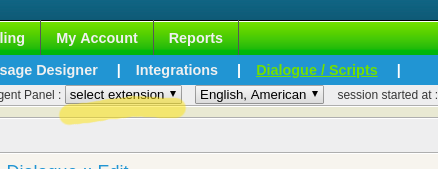
User can even access integrated webphone by selecting the desired extension from top **Agent Panel** dropdown
Set agent status
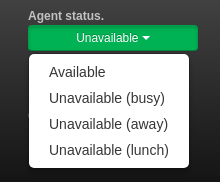
ICTBroadcast provides an option to change the status of Agent as well.
You can set the status of the agent by clicking **status button**. You can set the status either **available or leave**
Note: Only **Available** agent can receive forwarded calls
### Call Transfer
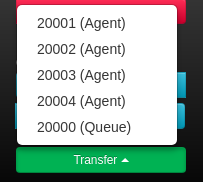
Transfering a call is not an issue now as call can be transfered to the desired extension by clicking the **call transfer** button and then selecting desired **extension**
Load Contact
You can view and edit prospect details by clicking on **load contact**.
Please note that it is different from popup URL. Instead of popup it will redirect current window to ICTBroadcast’s internal contact record where user can edit / update it accordingly.
Keypad / DTMF
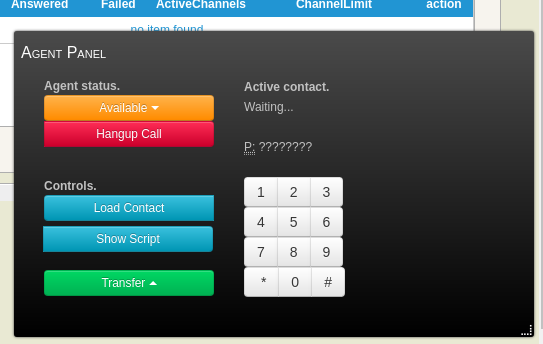
Handy keys are provided to the agent for operating webphone.
A List of useable key sequences that agent can use for different purposes is given below:
* For hangup press *0
* For call transfer press #1 and then enter target extension number alternatively (without pressing any key) agent can select target number from transfer drowdown button
* For attended call transfer press #2 followed by the target extension
[Forward to Agent on Answer](/Forward-to-agent-on-answer-without-playing-IVR-OR-forward-to-agent-with-IVR-on-key-press)
Creating Personalized messages using custom tokens in SMS campaign